
What Does nios_next_ip Do in Ansible?
In the last post, we covered Infoblox and Ansible using “nios_next_network”. Today we are going to cover “nios_next_ip”. You can use this command to auto-create records such as “host”, “a record”, “aaaa record”, etc… This is going to be very similar to the last post covering “nios_next_network”, where we build on top of each lookup. I will add a more advanced playbook to help you get the next network, create the network, then get the next IP and create a host.
How Do You Retrieve the Next Available IP Address with nios_next_ip?
First, we will create a “host” called “test1.ansible.com” in our test network (“10.10.2.0/24”), with an IP of “10.10.2.1”. (I’m not going to show every step of creating a “host”.) Here is a screenshot of the network:
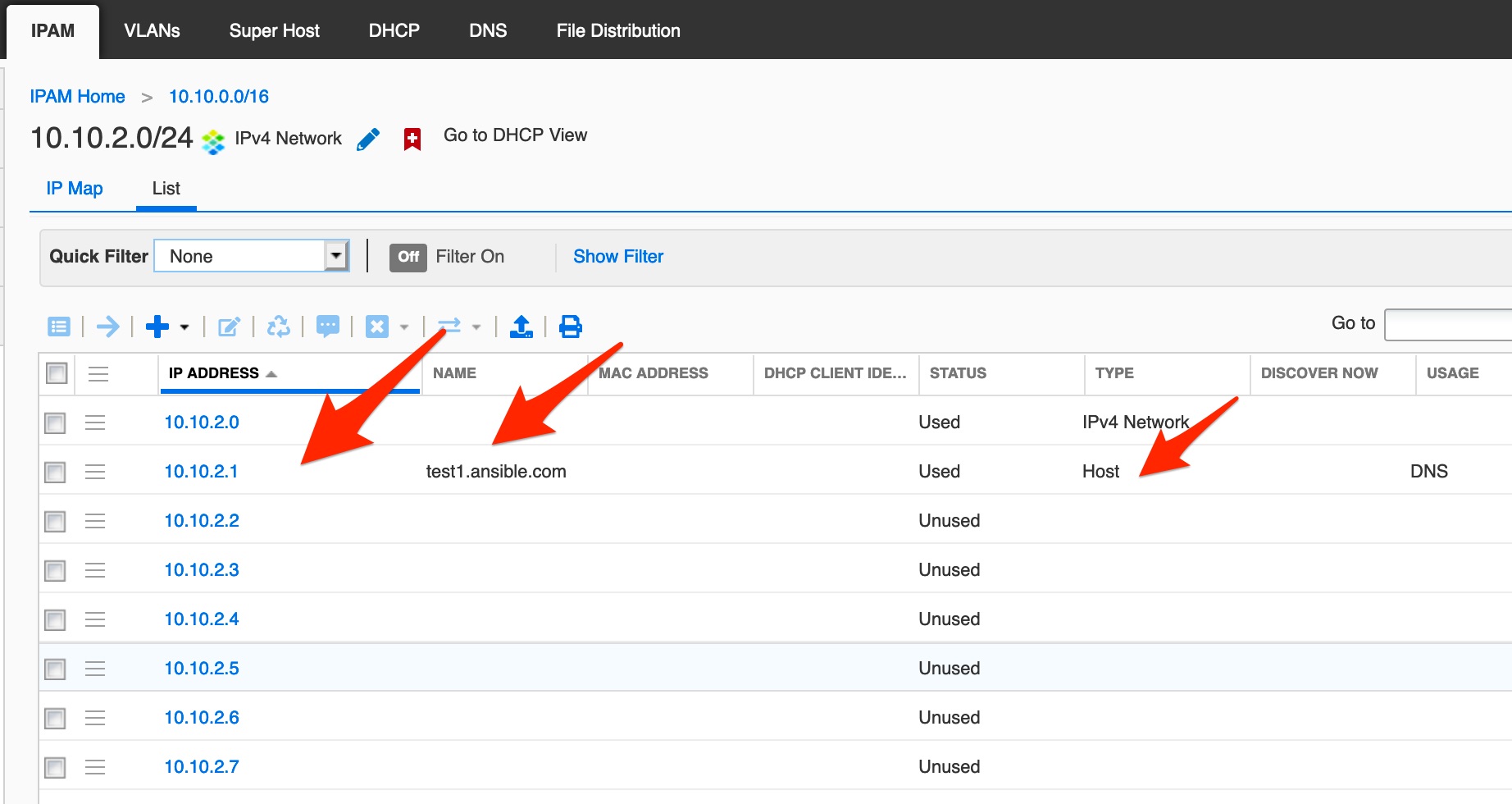
Now we will create our playbook to retrieve the next IP address in “10.10.2.0/24”. Create a new file called “lk_next_ip.yml”:
---
- hosts: nios
  connection: local
  tasks:
    - name: return next available IP address for network 10.10.2.0/24
      set_fact:
        ipaddr: "{{ lookup('nios_next_ip', '10.10.2.0/24', provider=nios_provider) }}"
        provider: "{{ nios_provider }}"
    - name: display IP
      debug:
        var: ipaddr
Notice we are now using “nios_next_ip” with “lookup”. Let’s run the playbook:
$ ap lk_next_ip.yml

PLAY [nios] **************************************************************************************************************************************************

TASK [Gathering Facts] ***************************************************************************************************************************************
ok: [192.168.0.200]

TASK [return next available IP address for network 10.10.2.0/24] *********************************************************************************************
ok: [192.168.0.200]

TASK [display IP] ********************************************************************************************************************************************
ok: [192.168.0.200] => {
    "ipaddr": [
        "10.10.2.2"
    ]
}

PLAY RECAP ***************************************************************************************************************************************************
192.168.0.200              : ok=3    changed=0    unreachable=0    failed=0    skipped=0    rescued=0    ignored=0
As you can see from the output, the playbook returned “10.10.2.2”, since “10.10.2.1” is already in use. What if we wanted to retrieve more than one IP address? What would that look like? Let’s create a new playbook called “lk_next_ip_more.yml”. We will pass “num” for the number of networks we want to return:
---
- hosts: nios
  connection: local
  tasks:
    - name: return next available IP address for network 10.10.2.0/24
      set_fact:
        ipaddr: "{{ lookup('nios_next_ip', '10.10.2.0/24', num=5, provider=nios_provider) }}"
        provider: "{{ nios_provider }}"
    - name: display IP
      debug:
        var: ipaddr
Notice above we added the foundation “num=5” asking for the next “5” IPs that are free. Let’s run the playbook and look at the results:
$ ap lk_next_ip_more.yml

PLAY [nios] **************************************************************************************************************************************************

TASK [Gathering Facts] ***************************************************************************************************************************************
ok: [192.168.0.200]

TASK [return next available IP address for network 10.10.2.0/24] *********************************************************************************************
ok: [192.168.0.200]

TASK [display IP] ********************************************************************************************************************************************
ok: [192.168.0.200] => {
    "ipaddr": [
        "10.10.2.2",
        "10.10.2.3",
        "10.10.2.4",
        "10.10.2.5",
        "10.10.2.6"
    ]
}

PLAY RECAP ***************************************************************************************************************************************************
192.168.0.200              : ok=3    changed=0    unreachable=0    failed=0    skipped=0    rescued=0    ignored=0
As you can see, we return “10.10.2.2” to “10.10.2.6”. Now, let the fun begin! We are going to create a playbook that will get the “nios_next_ip” and create a new “host” with the retrieved IP address. Create a new playbook named “create_host_next_ip.yml”:
---
- hosts: nios
  connection: local
  tasks:
    - name: return the next available IP addresses for network 10.10.2.0/24
      set_fact:
        ipaddr: "{{ lookup('nios_next_ip', '10.10.2.0/24', provider=nios_provider) }}"
        provider: "{{nios_provider}}"
    - name: Print the range of IPs calculated above
      debug:
        var: ipaddr
    - name: configure a host
      nios_host_record:
        name: test2.ansible.com
        ipv4addrs:
            - ipv4addr: "{{ item }}"
        comment: this is a test comment
        state: present
        provider: "{{nios_provider}}"
      loop: "{{ ipaddr }}"
Notice above we are going to ask for the next free IP address in “10.10.2.0/24” and create a new HOST “test2.ansible.com” with the retrieved IP address. Let’s run the playbook and see the results:
$ ap create_host_next_ip.yml

PLAY [nios] *******************************************************************************************************************************************************************************************************

TASK [Gathering Facts] ********************************************************************************************************************************************************************************************
ok: [192.168.0.200]

TASK [return the next available IP addresses for network 10.10.2.0/24] ***************************************************************************************************************************************
ok: [192.168.0.200]

TASK [Print the range of IPs calculated above] ********************************************************************************************************************************************************************
ok: [192.168.0.200] => {
    "ipaddr": [
        "10.10.2.2"
    ]
}

TASK [configure a host] *******************************************************************************************************************************************************************************************
changed: [192.168.0.200] => (item=10.10.2.2)

PLAY RECAP ********************************************************************************************************************************************************************************************************
192.168.0.200              : ok=4    changed=1    unreachable=0    failed=0    skipped=0    rescued=0    ignored=0
Notice we got back the IP address “10.10.2.2” and “changed” status of “1”. Let’s log into to NIOS and take a look:
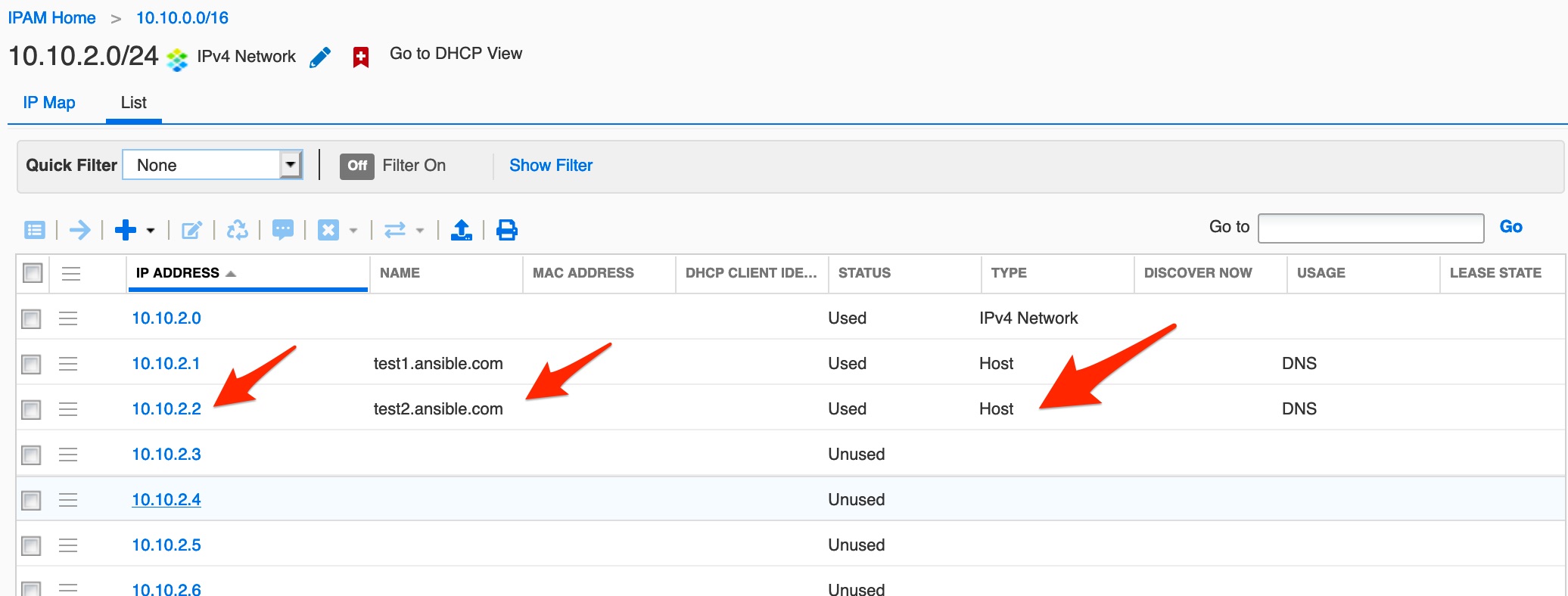
How Do You Auto-Create Host Records Using nios_next_ip?
Now that we have this great playbook, let’s see if we can make it a little smarter. Do you really want to edit the file every time you have to create a new HOST? We are going to create a new playbook “create_host_next_ip_args.yml” (I know not creative with filenames, but it keeps it simple for me to remember):
---
- hosts: nios
  connection: local
  tasks:
    - name: return the next available IP addresses for network 10.10.2.0/24
      set_fact:
        ipaddr: "{{ lookup('nios_next_ip', '10.10.2.0/24', provider=nios_provider) }}"
        provider: "{{nios_provider}}"
    - name: Print the range of IPs calculated above
      debug:
        var: ipaddr, new_hostname
    - name: configure a host
      nios_host_record:
        name: "{{ new_hostname }}"
        ipv4addrs:
            - ipv4addr: "{{ item }}"
        comment: this is a test comment
        state: present
        provider: "{{nios_provider}}"
      loop: "{{ ipaddr }}"
Notice that we added some quotes around ”{{ new_hostname }}”. This will allow us to pass the value using “–extra-vars”. Also, I added “ipaddr, new_hostname” to show the variables being passed and returned. Let’s run this playbook with “-e”, which is the shortened version of “–extra-vars”, and pass in a “new_hostname”:
$ ap create_host_next_ip_args.yml -e "new_hostname=test3.ansible.com"

PLAY [nios] *******************************************************************************************************************************************************************************************************

TASK [Gathering Facts] ********************************************************************************************************************************************************************************************
ok: [192.168.0.200]

TASK [return the next available IP addresses for network 10.10.2.0/24] ***************************************************************************************************************************************
ok: [192.168.0.200]

TASK [Print the range of IPs calculated above] ********************************************************************************************************************************************************************
ok: [192.168.0.200] => {
    "ipaddr, new_hostname": "(['10.10.2.3'], 'test3.ansible.com')"
}

TASK [configure a host] *******************************************************************************************************************************************************************************************
changed: [192.168.0.200] => (item=10.10.2.3)

PLAY RECAP ********************************************************************************************************************************************************************************************************
192.168.0.200              : ok=4    changed=1    unreachable=0    failed=0    skipped=0    rescued=0    ignored=0
As you can see above we passed the variable via CLI “-e “new_hostname=test3.ansible.com"". Let’s take a look at the results in NIOS:
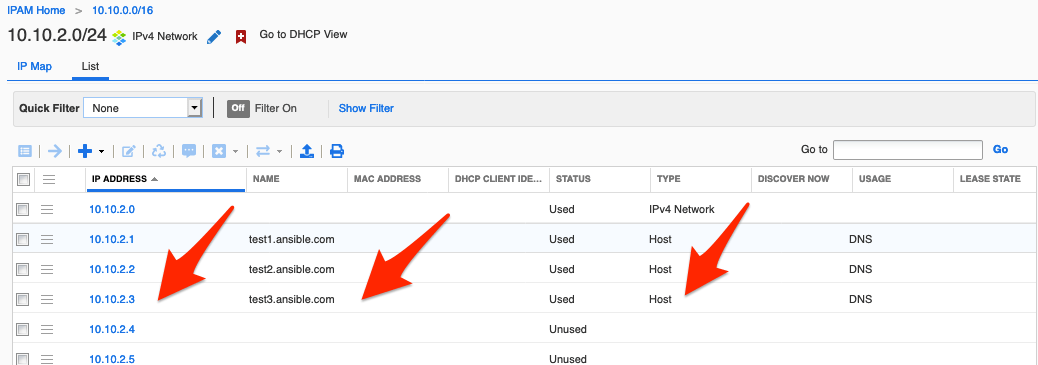
How Do You Create Multiple Hosts at Once with nios_next_ip?
Let’s say we want to create 2 or more new hosts, for example, “sif10.ansible.com” and “sif11.ansible.com”. We are going to create a new playbook “create_host_next_ip_args_2.yml“:
---
- hosts: nios
  connection: local
  tasks:
    - name: return the next 2 available IP addresses for network 10.10.2.0/24
      set_fact:
        ipaddr: "{{ lookup('nios_next_ip', '10.10.2.0/24', num=2, provider=nios_provider) }}"
        provider: "{{nios_provider}}"
    - name: Print the range of IPs calculated above
      debug:
        var: ipaddr, new_hostname
    - name: configure a host
      nios_host_record:
        name: "{{ item.1 }}"
        ipv4addrs:
            - ipv4addr: "{{ item.0 }}"
        comment: this is a test comment
        state: present
        provider: "{{nios_provider}}"
      with_together:
         - "{{ ipaddr }}"
         - "{{new_hostname }}"
Notice above I introduced you to something new, “with_together“, which merges lists into a synchronized list. In this example, it will take the 2 IPs returned and the 2 hostnames passed in via “args”. Let’s look at the results:
$ ap create_host_next_ip_args_2.yml -e '{"new_hostname":["sif10.ansible.com","sif11.ansible.com"]}'

PLAY [nios] **************************************************************************************************************************************************

TASK [Gathering Facts] ***************************************************************************************************************************************
ok: [192.168.0.200]

TASK [return the next 2 available IP addresses for network 10.10.2.0/24] **********************************************************************************
ok: [192.168.0.200]

TASK [Print the range of IPs calculated above] ***************************************************************************************************************
ok: [192.168.0.200] => {
    "ipaddr, new_hostname": "(['10.10.2.4', '10.10.2.5'], ['sif10.ansible.com', 'sif11.ansible.com'])"
}

TASK [configure a host] **************************************************************************************************************************************
changed: [192.168.0.200] => (item=['10.10.2.4', 'sif10.ansible.com'])
changed: [192.168.0.200] => (item=['10.10.2.5', 'sif11.ansible.com'])

PLAY RECAP ***************************************************************************************************************************************************
192.168.0.200              : ok=4    changed=1    unreachable=0    failed=0    skipped=0    rescued=0    ignored=0
WOW, it worked :). Now let’s look at NIOS:
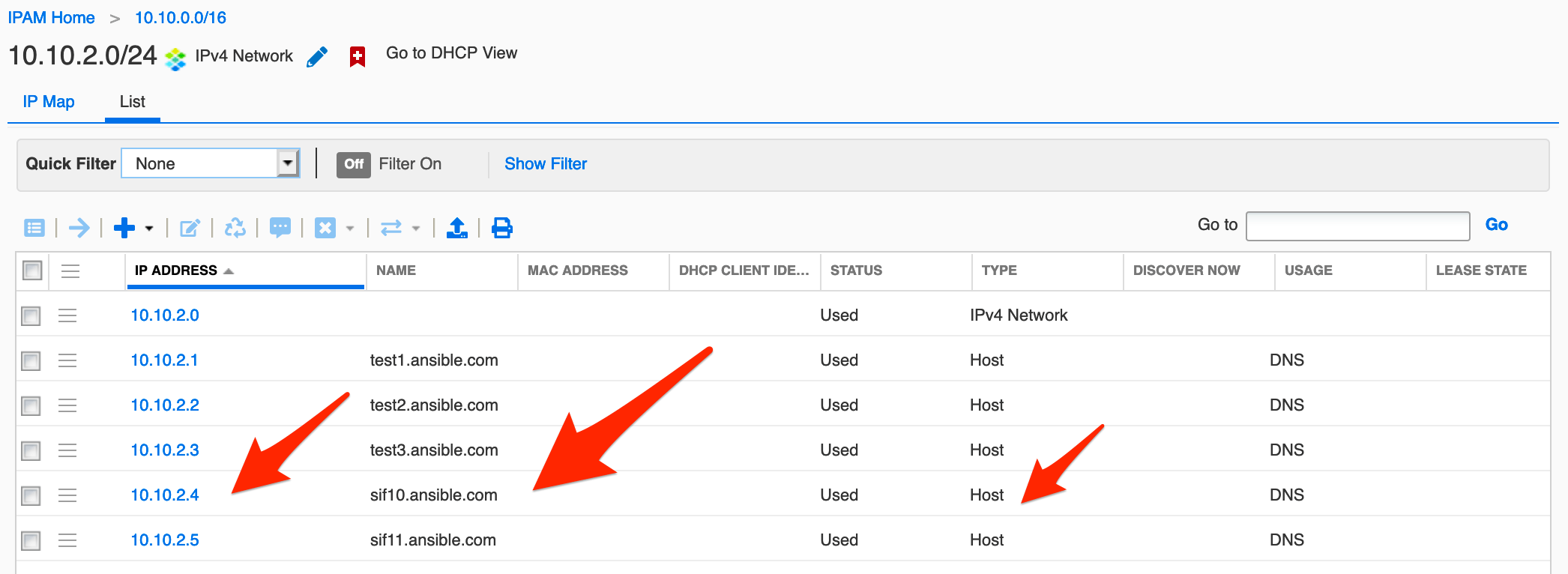
How Do You Pass Dynamic Hostnames to nios_next_ip from the CLI?

Let’s create a new playbook “create_host_next_ip_args_3.yml“:
---
- hosts: nios
  connection: local
  tasks:
    - name: return the next 2 available IP addresses for network 10.10.2.0/24
      set_fact:
        ipaddr: "{{ lookup('nios_next_ip', '10.10.2.0/24', num=num_ip, provider=nios_provider) }}"
        provider: "{{nios_provider}}"
    - name: Print the range of IPs calculated above
      debug:
        var: ipaddr, new_hostname
    - name: configure a host
      nios_host_record:
        name: "{{ item.1 }}"
        ipv4addrs:
            - ipv4addr: "{{ item.0 }}"
        comment: this is a test comment
        state: present
        provider: "{{nios_provider}}"
      loop: "{{ ipaddr|zip(new_hostname)|list }}"
We are making “num” a variable so we can pass it from the command line:
$ ap create_host_next_ip_args_3.yml -e '{"new_hostname":["sif12.ansible.com","sif13.ansible.com"],"num_ip":'2'}'

PLAY [nios] **************************************************************************************************************************************************

TASK [Gathering Facts] ***************************************************************************************************************************************
ok: [192.168.0.200]

TASK [return the next 2 available IP addresses for network 10.10.2.0/24] **********************************************************************************
ok: [192.168.0.200]

TASK [Print the range of IPs calculated above] ***************************************************************************************************************
ok: [192.168.0.200] => {
    "ipaddr, new_hostname": "(['10.10.2.6', '10.10.2.7'], ['sif12.ansible.com', 'sif13.ansible.com'])"
}

TASK [configure a host] **************************************************************************************************************************************
changed: [192.168.0.200] => (item=['10.10.2.6', 'sif12.ansible.com'])
changed: [192.168.0.200] => (item=['10.10.2.7', 'sif13.ansible.com'])

PLAY RECAP ***************************************************************************************************************************************************
192.168.0.200              : ok=4    changed=1    unreachable=0    failed=0    skipped=0    rescued=0    ignored=0
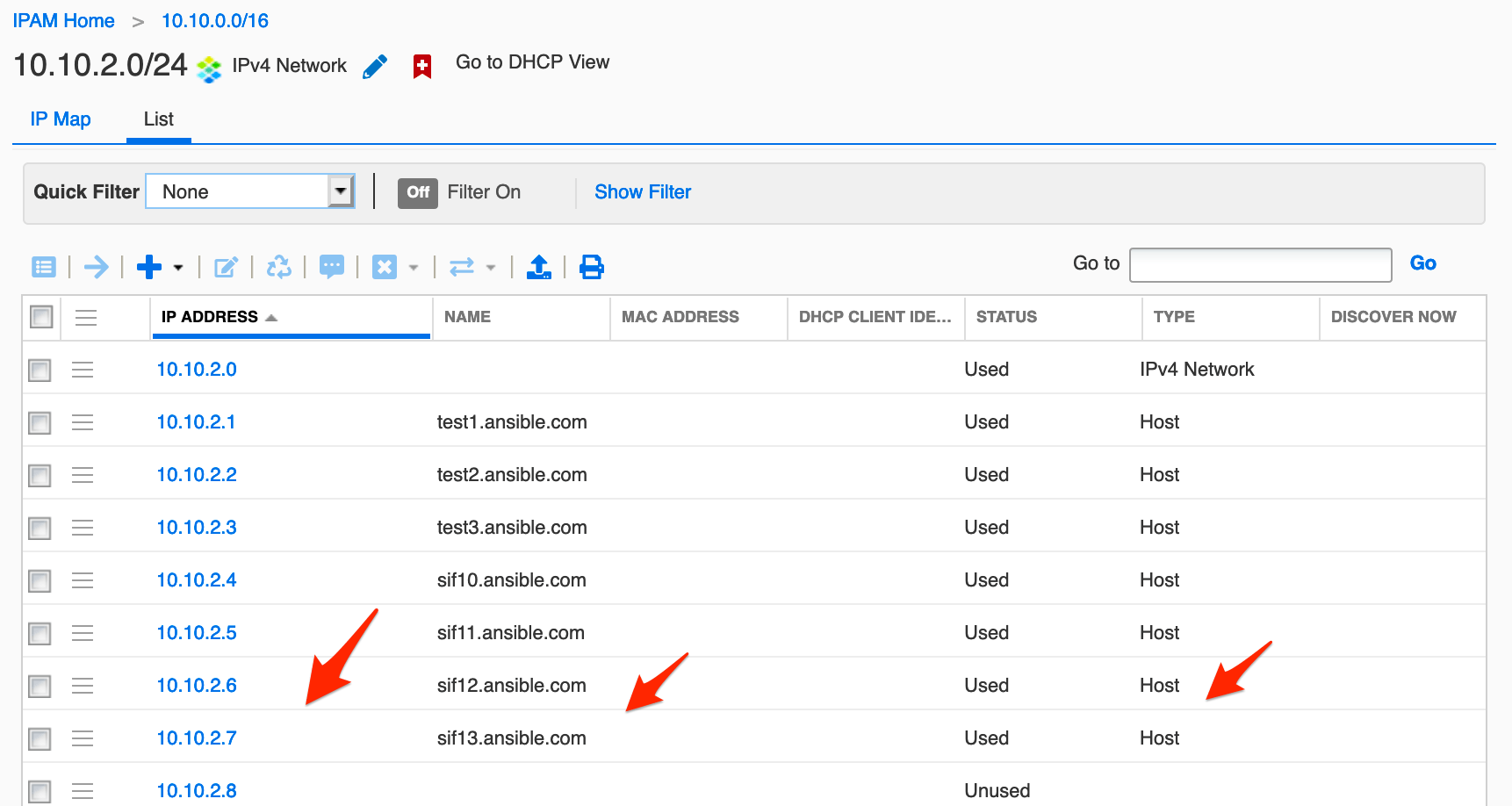
WOOT! We are making a very useable playbook. NOTE: I’m passing the “num” variable in with single quotes (‘ ‘), not double quotes (” “), In my experience, ‘ ‘ are for numbers and ” ” for strings. Let’s look at the results in NIOS:
When Should You Use nios_next_ip in Your Infoblox Ansible Playbooks?
You can see how powerful this playbook has become for creating a “host,” but you can easily modify it to create a CNAME, A Record, etc.. Now we have an idea of some of the great stuff “nios_next_ip,” “loop,” and “with_together” can do with Infoblox and Ansible.
Recommended Reading
New to the Infoblox and Ansible series, or want to explore the API from Python? Start here:
- Getting Started with Infoblox and Ansible — The beginning of this series: install Ansible, configure credentials, and run your first playbook.
- Infoblox and Ansible using “nios_next_network” — The previous post: find the next available subnet before assigning IPs.
- Infoblox and Ansible creating “DHCP Range” with “templates” — The next step: create DHCP ranges and Network Templates with Ansible.
- Introduction to Infoblox API (WAPI) using Python — Prefer Python scripts over YAML playbooks? This post covers the same Infoblox operations using
requestsandinfoblox-client.
Frequently Asked Questions
How do you pass a hostname as a command-line variable to an Ansible playbook?
Use the -e flag: ansible-playbook create_host_next_ip_args.yml -e "new_hostname=test3.ansible.com". Inside the playbook, reference it as "{{ new_hostname }}". For multiple hostnames, pass a JSON list: -e '{"new_hostname":["sif10.ansible.com","sif11.ansible.com"]}'.
What does with_together do in an Ansible playbook?
with_together merges two lists into synchronized pairs. In the nios_next_ip context it zips returned IP addresses with hostnames passed via --extra-vars, so each loop iteration creates exactly one host with one IP: with_together: ["{{ ipaddr }}", "{{ new_hostname }}"].
How do you get the next available IP and immediately create a host record in a single playbook?
Use a two-task playbook: first set a fact with nios_next_ip to capture the IP, then pass it to nios_host_record with state: present and loop: "{{ ipaddr }}". Ansible executes both steps sequentially in one run — no manual intervention required between the lookup and the creation.
Comments
No comments yet — be the first to share your thoughts.