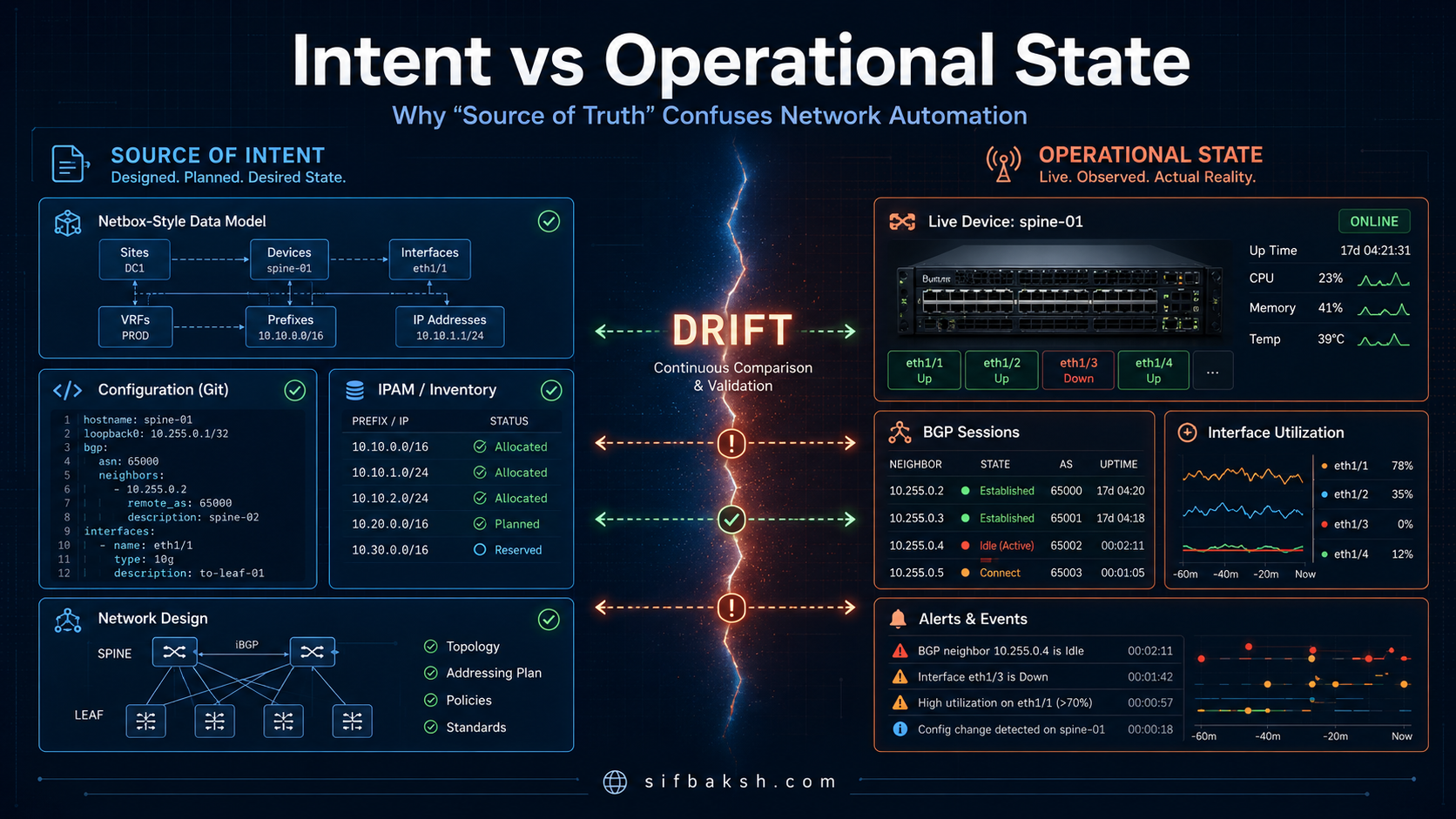
Hot take: “Source of Truth” is one of the most confusing terms in network automation.
Not because the idea is wrong. The idea is actually useful. The problem is that we often use the phrase like it means one thing, when in reality the “truth” of a network can live in several different places at the same time.
There is what you intended the network to be. There is what you documented in your design system. There is what your automation attempted to deploy. There is what actually landed on the device. And then there is what is running on the wire right now.
Those are not always the same thing.
In fact, in a real production network, they are often different. That difference is where a lot of network automation projects start to drift away from clean design and back into manual firefighting.
The Network Automation Forum (NAF) does a good job of helping us think about this more clearly. The NAF framework is described as a modular, vendor-neutral framework for network automation, with functional building blocks that help teams design or improve their automation strategy without starting from a specific tool first.
That framing matters because network automation is not just about pushing configs faster. It is about separating responsibilities, understanding which system owns which part of the workflow, and building a model where the network can be continuously compared against what was intended.
What Is the Problem With “Source of Truth” in Network Automation?
For years, network teams have used the phrase “source of truth” to describe the place where network data lives. Depending on the environment, that might be a spreadsheet, a Git repository, NetBox, Nautobot, an IP address management (IPAM) tool, a configuration management database (CMDB), a controller, a device configuration backup system, or even the live router or switch itself.
This is where the confusion starts.
When someone says, “NetBox is our source of truth,” what do they really mean? Do they mean NetBox contains the desired design? Do they mean NetBox reflects what is currently deployed? Do they mean NetBox is used to generate configurations? Do they mean NetBox is updated after every manual change? Or do they mean NetBox is where the team hopes the data is correct most of the time?
Those are very different things.
A design database should not be treated the same way as a live device configuration. A live device configuration should not automatically become authoritative just because it exists. A ticket marked “complete” does not mean the network is actually in the expected state. And a monitoring alert clearing does not always mean the design is correct.
This is why the phrase “source of truth” needs more precision in network automation. Instead of asking, “What is our source of truth?” we should ask, “What system represents our intended state, and how do we compare that intended state against operational reality?”
That is a much better question.
How Is Intent Different from Operational State?
The first distinction we need to make is between intent and operational state.
Intent is what the network is supposed to look like. It is the desired state. It is the model of correctness. It might include IP addressing, Virtual Local Area Networks (VLANs), routing protocols, interface assignments, service definitions, policy, device roles, operational thresholds, configuration templates, or relationships between systems. In the NAF framework, Intent is responsible for storing and handling the desired state of the network, including both configuration and operational expectations.
Operational state is different. Operational state is what the network actually looks like right now. It includes live configuration, interface status, routing neighbors, Border Gateway Protocol (BGP) session state, telemetry, logs, counters, flow data, errors, drift, and all the weird little exceptions that show up in production environments.
Both are important, but they are not the same thing.
Intent tells you what should be true. Operational state tells you what is true right now. Drift is the gap between the two.
That sounds simple, but this distinction changes how you think about automation. If you treat the live device as the ultimate truth, then whatever is running becomes authoritative. That means mistakes, emergency changes, and undocumented exceptions can quietly become part of your “truth.” If you treat intent as the model of correctness, then the live network becomes something you continuously validate against the design.
That is a very different operating model.
What Happens When You Treat the Live Router Config as Your Source of Truth?
Here is the uncomfortable part. If your live router configuration is your source of truth, then you may be treating bugs as authoritative.
Let’s say your intended design says a BGP neighbor should use remote autonomous system (AS) 65002. Your intended state might look something like this:
device: edge-rtr01
routing:
  protocol: bgp
  local_as: 65001
  neighbors:
    - ip: 192.0.2.2
      remote_as: 65002
      description: provider-a
      expected_state: established
From that intent, your automation generates this configuration:
router bgp 65001
 neighbor 192.0.2.2 remote-as 65002
 neighbor 192.0.2.2 description provider-a
So far, everything looks good.
Now imagine there is an outage at 2:00 AM. Someone logs into the router manually and changes the neighbor to remote AS 65020 while troubleshooting. Maybe they were testing something. Maybe they fat-fingered the value. Maybe they were working from old documentation. Maybe they were under pressure and just needed to get something working.
The device now shows this:
router bgp 65001
 neighbor 192.0.2.2 remote-as 65020
 neighbor 192.0.2.2 description provider-a
The device now has a configuration, and that configuration is real because it exists on the router. But real does not automatically mean correct. The Source of Intent says the BGP neighbor should use remote AS 65002, while the operational state shows the device configured with remote AS 65020.
That difference matters because it creates a gap between what the network was designed to do and what it is actually doing. The BGP session may be down because of the mismatch, which is the obvious failure mode. But there is also a more dangerous possibility: someone may have changed something upstream, and now the session is established even though it no longer matches the original design.
This is where intent-first automation becomes valuable. Instead of simply asking, “What is currently configured on the device?” the system can ask a better question: “Does the current operational state match the intended design?” That shift changes the role of automation from basic configuration deployment to continuous validation.
Why Is Configuration Drift Not the Exception in Production Networks?
A lot of automation conversations assume drift is an edge case. I do not think that is true. Drift is the daily reality of production networks.
Drift happens when someone makes an emergency change and forgets to update the design system. It happens when a vendor controller makes a change that does not get reflected in the CMDB. It happens when documentation gets updated after the fact, but not quite correctly. It happens when a script fails halfway through a deployment. It happens when one device in a redundant pair gets updated and the other does not. It happens when a temporary workaround becomes permanent because nobody wants to touch it again.
This is why automation teams need to be careful when they use the phrase “source of truth.” If the source of truth is really just “whatever exists right now,” then the system has no way to tell the difference between a valid change and a mistake.
Intent-first automation flips that model. The design defines correctness. The live network reports reality. Automation compares the two. When they do not match, the system can create an event, open a ticket, notify a team, request approval, trigger remediation, or simply record the drift for review.
That is a much healthier way to operate.
How Should Intent Be Structured in a Network Automation System?
One of the most important points in the NAF framework is that Intent must be represented in a structured form. The framework says Intent must be capable of representing network-related aspects such as IP addressing, data center infrastructure, routing protocols, virtualized services, secrets, operational levels, configuration templates, artifacts, service abstractions, and policy definitions. It also says this data must support create, read, update, and delete operations, and access should be exposed through a standardized, documented application programming interface (API) such as Representational State Transfer (REST) or GraphQL.
That is a big deal because intent cannot just live in someone’s head.
It also cannot only live in a PDF, a diagram, or an old spreadsheet attached to a ticket. Humans may be able to interpret those things, but automation systems need structured data that can be queried, validated, transformed, and compared against operational state.
For example, this is not very useful intent:
Leaf01 connects to the app server on VLAN 120.
Use the normal gateway.
Make sure BGP is good.
A human who knows the environment may understand what that means, but a system cannot safely automate from that. What is the normal gateway? Which interface is connected to the app server? What should the BGP neighbor be? Which site is this for? Is VLAN 120 valid on this fabric? What does “good” mean for BGP?
A more useful version of intent would look like this:
site: atlanta-dc1
device: leaf01
interface: Ethernet1/10
role: server_access
connected_endpoint:
  name: app-server-01
  type: physical_server
vlan:
  id: 120
  name: app-prod
ip:
  address: 10.10.20.10
  prefix_length: 24
routing:
  protocol: bgp
  local_as: 65101
  peer_as: 65200
  neighbor: 10.10.20.1
expected_state:
  interface_admin_status: up
  interface_oper_status: up
  bgp_session_state: established
Now we have something a system can work with. We can validate the IP address. We can confirm whether the VLAN exists. We can check whether the interface is already assigned. We can generate vendor-specific configuration. We can collect the actual state from the device. Then we can compare the intended state against what is really running.
This is where automation becomes more than a script that pushes commands. It becomes a system that understands what correct looks like.
Why Should Intent Be Vendor-Neutral Where Possible?
The NAF framework also recommends that intent modeling should use a neutral representation that can be derived into vendor-specific configuration artifacts. It also says the Intent layer should provide a consistent and unified view of the desired state, even when the data is distributed across multiple systems.
That point is important because most real networks are not single-vendor fairy tales.
You may have Cisco in one part of the network, Arista in another, Juniper at the edge, Fortinet or Palo Alto for firewalls, Infoblox for IPAM and DNS, NetBox for inventory, ServiceNow for change management, and Git for templates or service definitions. If your intent is stored only as vendor-specific CLI, you have already limited how portable and reusable your automation can be.
A neutral intent model lets you describe what should exist without immediately tying the design to one vendor’s syntax.
For example, the intent might say:
interface:
  name: Ethernet1/10
  description: app-server-01
  mode: access
  vlan: 120
  admin_state: enabled
From there, one rendering process may create Cisco-style configuration, while another may create Arista-style configuration, and another may create API payloads for a controller. The intent remains consistent, even if the execution path changes based on platform.
That does not mean vendor-specific details disappear. They still matter. Anyone who has worked in networking knows the differences always show up eventually. But the goal is to avoid making vendor syntax the starting point for the design. The design should describe the outcome first, then the automation should translate that outcome into the right implementation.
What Else Does Intent Include Beyond Device Configuration?
Another mistake teams make is thinking intent only means configuration. It does not.
Intent can include operational expectations too.
For example, your intent may define that a leaf switch should not exceed 70 percent CPU for a sustained period, that a BGP session must remain established, that an interface should be administratively up and operationally up, or that a circuit should only be changed during a specific maintenance window.
That kind of intent may look like this:
device_role: leaf_switch
operational_expectations:
  max_cpu_percent: 70
  max_memory_percent: 80
  interface_error_threshold: 100
  required_bgp_state: established
  maintenance_window:
    allowed_days:
      - sunday
    start_time: "01:00"
    end_time: "04:00"
This is not a traditional device configuration template, but it is still intent. You are describing what healthy should look like. That matters because a device can have the correct configuration and still fail to deliver the expected service.
This is where observability becomes critical. In the NAF framework, Observability persists actual network state and defines logic to process it. The framework also says Observability should expose insights into the current network state and automatically generate events when discrepancies are detected between actual state and intended state.
That is the part I think many teams are missing. Monitoring tells you something happened. Observability tied to intent tells you whether what happened violates the design.
How Does Intent-Aware Validation Work in Practice?
How Does Intent-Aware Validation Catch VLAN Drift?
Let’s take a simple workflow like assigning a VLAN to a server-facing interface.
The intended state may say that leaf01 interface Ethernet1/10 should be assigned to VLAN 120, connected to app-server-01, and administratively enabled.
device: leaf01
interface: Ethernet1/10
description: app-server-01
mode: access
vlan: 120
admin_state: up
The generated configuration might look like this:
interface Ethernet1/10
 description app-server-01
 switchport mode access
 switchport access vlan 120
 no shutdown
After deployment, a collector retrieves the actual configuration and operational state from the device. It may find this:
{
  "device": "leaf01",
  "interface": "Ethernet1/10",
  "description": "app-server-01",
  "mode": "access",
  "vlan": 130,
  "admin_state": "up",
  "oper_state": "up"
}
At first glance, the interface is up, so traditional monitoring may not alert. But intent-aware validation sees a problem. The intended VLAN is 120, while the actual VLAN is 130. That is drift.
This is the kind of issue that can quietly cause application problems, segmentation issues, security policy violations, or routing confusion. The interface may look healthy from a basic up/down perspective, but it is not compliant with the intended design.
A good automation system should be able to detect this difference and take the next appropriate action. Maybe it opens a ticket. Maybe it notifies the NetOps team. Maybe it creates a case in a workflow platform. Maybe it checks whether there is an approved change explaining the difference. Maybe it triggers remediation after approval.
The important point is that the system knows the difference between “up” and “correct.”
Those are not the same thing.
How Does Intent Apply to Firewall Policy Management?
This same concept applies outside of routing and switching.
Let’s say your intent model defines an application called billing-api. The service should allow Hypertext Transfer Protocol Secure (HTTPS) traffic from the application subnet to a database subnet, but only from approved source networks.
Your intended policy might look like this:
application: billing-api
source:
  subnet: 10.20.10.0/24
destination:
  subnet: 10.30.50.0/24
service:
  protocol: tcp
  port: 443
action: allow
owner: finance-app-team
valid_until: 2026-12-31
Now imagine someone adds a broader firewall rule during troubleshooting:
source:
  subnet: 10.20.0.0/16
destination:
  subnet: 10.30.50.0/24
service:
  protocol: tcp
  port: any
action: allow
The firewall is now running a rule that may technically solve the immediate connectivity problem, but it no longer matches the intended policy. If your firewall configuration is treated as the source of truth, that broader rule becomes accepted reality. If your intent model is the source of correctness, that rule becomes drift or an exception that needs review.
This is why intent should also include metadata like ownership, timestamps, data origin, and valid periods. The NAF framework specifically recommends metadata that supports data governance, including timestamps, origin, ownership, and valid periods. It also says intent operations should ideally be transactional, support custom validation, and provide versioned access to data.
That governance layer matters because automation without governance can make a mess at scale. If bad data enters your intent model, automation can faithfully execute bad decisions very quickly.
What Does a Better Network Automation Workflow Look Like?
A more mature network automation workflow does not start with “log into the device and make a change.” It starts by updating intent.
For example, an engineer or service owner requests a new network service. The intended state is created in a system such as NetBox, Nautobot, Git, an internal portal, or another source that can represent structured desired state. That change is validated before anything touches the network. The system checks whether the IP address is available, whether the VLAN is valid, whether the device exists, whether the interface is free, whether the policy is allowed, and whether the request fits within the operating model.
Once validated, the automation can generate a configuration artifact or API payload. Before deployment, the executor can perform a dry run, which is also something the NAF framework recommends for execution tasks. The framework also notes that execution should be idempotent, meaning rerunning the operation should produce the same result rather than creating unexpected changes.
After deployment, the collector retrieves the actual state from the network. The observability layer stores and processes that state. Then the system compares the actual state against the intended state. If they match, the workflow can close out successfully and record evidence. If they do not match, the workflow can create a drift event and route it to the right next step.
That end-to-end process is what moves automation from “we pushed a config” to “we know the network matches the design.”
Where Does the Orchestrator Fit in a Network Automation Workflow?
This is also where orchestration becomes important.
In the NAF framework, the Orchestrator coordinates and integrates processes across the different building blocks. It does not directly interact with the network infrastructure, but it helps coordinate workflows in response to events. The framework also says orchestration should support event-driven execution, scheduled workflows, dry runs, traceability, and potentially compensating actions when something goes wrong.
In practical terms, the orchestrator is what connects the dots.
A drift event is detected. The orchestrator checks whether there is an approved change. It looks up the device owner. It creates a ticket or case. It sends a message to the right team. It may request approval before remediation. It may trigger a rollback workflow. It may collect more context before deciding what to do next.
That is important because not every drift event should be automatically fixed. Some drift should be corrected immediately. Some should be reviewed. Some should be accepted and merged back into intent. Some should trigger an incident. Some should be ignored during a maintenance window.
The goal is not blind automation. The goal is controlled automation with enough context to take the right action.
What Is a Simple Mental Model for Intent vs Operational State?
The simplest way I think about this is:
Intent            = what should be true
Operational state = what is true right now
Drift             = the difference between the two
Automation        = the system that manages the gap
That model clears up a lot of confusion.
It also helps teams stop arguing about whether Git, NetBox, Nautobot, the CMDB, the controller, or the router is the source of truth. The better conversation is about which system owns which responsibility.
Git might version service definitions and templates. NetBox or Nautobot might represent inventory, IP addressing, interfaces, and relationships. A controller might expose deployed state. A telemetry platform might expose operational state. A workflow platform might coordinate approval, execution, and remediation. The device itself exposes what is actually configured and running.
Each system has a job. The problems start when we pretend one system does all of those jobs perfectly.
What Should Teams Do First When Starting Intent-Based Automation?
If you are early in this journey, do not try to model the entire network on day one. That is how good automation ideas turn into twelve-month data modeling projects that never reach production.
Start with one painful workflow.
Pick something narrow and useful, such as interface turn-up, VLAN assignment, BGP neighbor validation, firewall object cleanup, device onboarding, DNS/IPAM consistency, or configuration drift detection.
For that workflow, define three things.
First, define the intended state. What should be true? For an interface workflow, that might include the device, interface, description, VLAN, administrative state, connected endpoint, and expected operational status.
Second, define how you will collect the actual state. Will you use Secure Shell (SSH), Network Configuration Protocol (NETCONF), gRPC Network Management Interface (gNMI), Simple Network Management Protocol (SNMP), an API, a controller, a configuration backup, or a telemetry system? The NAF framework separates collection from execution for this reason. The Collector focuses on retrieving actual state from the network, while the Executor focuses on tasks that alter network state.
Third, define what happens when the two do not match. This is the part teams often skip. Detecting drift is useful, but deciding what to do with drift is where the operational value shows up. Should the system open a ticket? Notify Slack or Teams? Create a case? Ask for approval? Remediate automatically? Suppress the alert during a maintenance window? Escalate if the drift touches a critical service?
That drift response is where automation becomes part of the operating model instead of just another tool.
Why Is Intent-Based Automation Really About Trust?
At the end of the day, this conversation is really about trust.
Can you trust your design data? Can you trust your automation to generate the right changes? Can you trust your deployment process? Can you trust that the network actually matches the design? Can you trust that manual exceptions will be detected? Can you trust that compliance means something beyond “the ticket was closed”?
That is why the separation between intent and operational state matters. It gives you a way to reason about the network with more confidence. It lets you say, “This is what we intended, this is what we observed, this is where they differ, and this is what we did about it.”
That is a much stronger position than saying, “The router has a config, so I guess that is the truth.”
“Source of Truth” sounds clean, but in network automation it often hides a lot of messy assumptions.
The truth is not one thing. There is what we designed, what we approved, what we generated, what we deployed, what changed later, what is currently running, and what the service actually needs to be healthy.
The goal is not to crown one system as the magical source of truth and move on. The goal is to build a workflow where intent is clear, operational state is visible, drift is detected, and the right action happens next.
That is why I like the way the NAF framework separates these concepts. It gives us a cleaner language for talking about automation architecture, and it helps us avoid one of the biggest traps in this space: mistaking the current state of the network for the correct state of the network.
The gap between intended state and operational state is not an edge case.
It is the job.
Recommended Reading
- P.E.N.E.: The Prompt Framework I’m Using to Build AI Agents for Network Operations — Extends this thinking into AI-driven NetOps: how to structure agent behavior contracts for BGP reviews, drift detection, and change planning.
- Getting Started with Infoblox and Ansible — A practical guide to using Infoblox as a structured source of intent, with Ansible as the execution layer for network changes.
- Introduction to Infoblox API (WAPI) Using Python — Shows how to programmatically access IPAM data via API — the same pattern that feeds structured intent into automation workflows.
Frequently Asked Questions
What is the difference between intent and operational state in network automation? Intent is the desired state — what you designed the network to look like, including IP addressing, VLANs, BGP neighbors, and expected operational behavior. Operational state is what is actually running on the devices right now. The gap between the two is called drift, and detecting it is one of the most important functions a mature automation system can perform.
What causes configuration drift in production networks? Drift is not an edge case — it is the daily reality of production networks. Common causes include emergency out-of-band changes made during incidents, vendor controller updates that bypass the change management process, partial automation failures where only some devices receive a change, temporary workarounds that quietly become permanent, and documentation that gets updated after the fact but not quite correctly.
What is the NAF framework for network automation? The Network Automation Forum (NAF) framework is a modular, vendor-neutral reference architecture for network automation. It separates responsibilities across functional building blocks including Intent, Collector, Executor, Orchestrator, and Observability. It is not a product or vendor tool — it is a conceptual model that helps teams design automation systems with clear ownership at each layer.
How do you detect drift between intended and actual network state? The typical pattern is: store structured intent in a system like NetBox, Nautobot, or Git; collect actual state from devices using SSH, NETCONF, gNMI, or an API; then compare the two using a validation layer. When a mismatch is found — such as a VLAN ID that differs from the intended value or a BGP session in an unexpected state — the system generates a drift event and routes it to the appropriate team or workflow.
What should teams do first when implementing intent-based network automation? Start with one painful workflow rather than trying to model the entire network. Good starting points include VLAN assignment validation, BGP neighbor state checking, interface turn-up, or DNS/IPAM consistency. For the chosen workflow, define the intended state, define how you will collect actual state, and — most importantly — define what action the system should take when drift is detected. That drift response is where the real operational value lives.
Comments
No comments yet — be the first to share your thoughts.