In the last article, I wrote about why “source of truth” gets confusing in network automation. Intent tells us what should be true. Operational state tells us what is true right now. Drift is the gap between the two.
That raises the next question: once you find the gap, what happens next?
This is where a lot of teams get stuck. They may have scripts, playbooks, monitoring jobs, dashboards, and a few clever automations that save real time. But they still rely on engineers to manually coordinate the process around those tools. The engineer checks the request, pulls context from inventory, looks at live state, reviews recent changes, decides whether it is safe to act, runs the script, validates the result, updates the ticket, and leaves behind whatever evidence they remembered to capture.
That coordination gap is where network automation maturity usually stalls.
Most network automation teams do not fail because they lack scripts. They fail because nobody has built the layer that coordinates intent, operational state, policy, approvals, execution, and evidence into one operating model.
Scripts Solved Part of the Problem
Most network teams I talk to have moved past the “we do not do any automation” stage. There is a Python script that pushes VLAN config. There is an Ansible playbook that handles interface changes. Someone wrote a Tines flow or a scheduled job that pulls BGP state every few minutes. Individually, these things work. They save time, they cut down on manual CLI sessions, and they make the person who wrote them look like a hero for a quarter or two.
The problem shows up later, when there are twelve of these scripts instead of one, each written by a different engineer, each with its own assumptions about what “done” means. One script pushes config and exits zero the moment the CLI accepts the commands. Another waits for a health check. A third does not check anything at all because it assumes the change worked if nothing threw an error. None of them talk to each other. None of them know whether a change freeze is active, whether the CMDB entry is stale, or whether someone already tried this exact fix three days ago and rolled it back.
Scripts are good at doing one thing precisely and repeatably. They are not good at knowing when they should run, what should happen before they run, or what should happen after. That is not a criticism of scripting. It is a reminder that scripts solve task execution, not operational coordination.
The Real Problem Is Coordination
I have come to think most network automation teams do not fail because they lack scripts. They fail because nobody coordinates the full workflow around the script. The script is the easy part. Deciding when it should fire, what context it needs first, who has to sign off, and what evidence gets left behind afterward is the part that actually determines whether automation is trustworthy.
This gap shows up in familiar ways. A firewall rule gets pushed through an automated pipeline, but nobody captured why the rule was needed, so six months later it is still there long after the project that justified it wrapped up. A migration runbook works flawlessly in staging, then breaks in production because the automation did not check whether a maintenance window was actually open. An engineer manually patches a config to fix an urgent issue, and the automation platform has no idea the change happened, so the next run silently reverts it.
None of these are scripting failures. They are coordination failures. The script did exactly what it was told. The missing piece was the layer that decides what “told” should mean in that specific moment, given everything else happening in the environment.
Where the Orchestrator Fits in the NAF Model
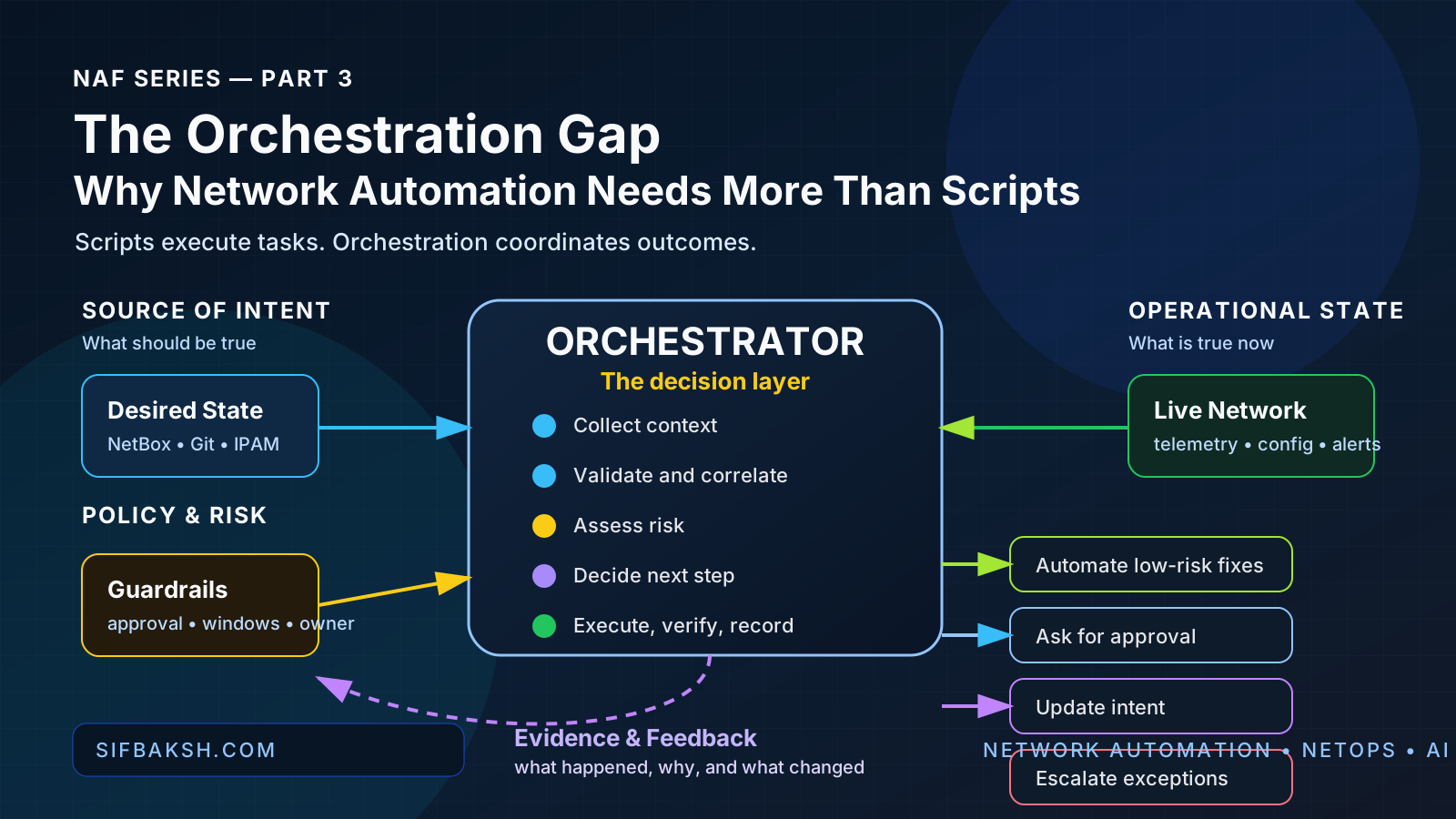
If you have spent time around the Network Automation Forum’s thinking, this framing will feel familiar: intent tells us what should be true, operational state tells us what is true right now, and drift is the gap between the two. Automation exists to manage that gap.
What often gets skipped is the layer that decides what to do about the gap once it has been found. Detecting drift is useful. Deciding whether that drift is safe to auto-remediate, needs a human, or should update the source of intent instead is a different job, and it is the job many teams leave unfinished.
That decision layer is the orchestrator.
The important thing is that the orchestrator is a role, not a logo. In one environment, that role might be handled by a workflow platform. In another, it may be a combination of event bus, CI/CD pipeline, automation controller, ticketing system, and custom glue code. The architecture matters more than the brand name. Something has to coordinate the process, preserve context, enforce decision points, and record evidence.
The first word in network automation is still network. The orchestrator does not replace that domain expertise. It gives that expertise a consistent place to live instead of scattering it across a dozen unrelated scripts.
Intent, State, and the Decision Layer
It helps to separate three things that get blended together far too often: intent, state, and the decision about what to do with the difference between them.
Intent is your desired-state model. That may live in NetBox, Nautobot, a Git repo full of YAML, or whatever system your team has standardized on. It describes what the network is supposed to look like.
Operational state is what you get when you query the devices, pull BGP tables, check interface counters, inspect firewall rules, or collect telemetry. It describes what the network actually looks like right now, which is not always the same thing, especially after a few months of manual fixes, maintenance exceptions, partial migrations, and one-off changes.
The decision layer sits between those two and asks a narrower question than “is there drift?” It asks: given this specific piece of drift, in this specific environment, right now, what should happen next?
Sometimes the answer is auto-remediate because the fix is low-risk and well understood. Sometimes it is page an engineer because the drift touches something sensitive. Sometimes the right move is not to fix the network at all. It is to update the desired-state model because the “drift” turned out to be a legitimate change that nobody documented. An orchestrator that can only push fixes is missing that last option entirely.
Example: BGP Drift From Detection to Decision
Say a peering session drops a set of expected prefixes. A monitoring job notices the gap and flags it as drift against the expected route table. That part is relatively straightforward. Plenty of tools can detect the difference.
What a coordinated workflow adds is everything after the flag.
Before anyone touches a router, the workflow checks whether there is an active maintenance window with the provider, since a scheduled change on their end would explain the missing routes without anything being broken on your side. It pulls recent change history for the peering device, because if someone edited a route map recently, that is a more likely culprit than a random provider issue. It checks whether this exact session has flapped before and whether there is a known pattern.
Only after that context is gathered does it decide what should happen next. Maybe this looks like a provider-side maintenance event and no network change is needed. Maybe it looks like an unexpected local policy change, so the workflow escalates to the engineer on call with the relevant diffs already attached.
The value is not just the BGP check itself. The value is that the engineer gets a timeline, context, and a working hypothesis instead of a raw alert and an empty terminal.
Example: Firewall Rule Request With Policy and Approval
Firewall automation often gets built as a straight line: someone requests a rule, the pipeline pushes it. That may help with volume, but it skips the parts that usually create long-term risk.
A workflow with real coordination behind it validates the request against existing policy first. It checks whether the rule conflicts with something already in place, whether it violates a segmentation standard, and whether the source or destination is already covered by a broader rule that makes the new request redundant. It checks whether the requester has the standing to ask for the change or whether the zones involved require a second approval. It confirms there is a linked change ticket and, critically, an expiration or review date, since “temporary” firewall rules are one of the most common sources of long-term drift I have seen.
Only once those checks pass does it execute the push, and it logs the full context alongside the rule itself: who asked, why they asked, what was checked, who approved it, and when it should be reviewed.
That audit trail is what makes the difference between a firewall rule you can defend during a security review and one nobody can explain a year later.
Example: Interface Turn-Up With Validation and Evidence
Interface and VLAN changes look simple on the surface, which is exactly why they are a good example of where weak automation cuts corners. A minimal version takes a VLAN ID and a port, pushes the config, and marks the ticket complete.
A network-first version does more before and after the push. Before the change, it confirms the VLAN actually exists and is standard for that site. It checks whether the requested gateway and DHCP scope requirements are already in place. It confirms whether the target port has trunk requirements that need to be handled alongside the access configuration. It also checks whether a firewall policy needs to exist before traffic on this VLAN can go anywhere useful.
After the change, the workflow confirms the interface actually came up, validates the expected VLAN membership, and updates monitoring so the new interface is being watched instead of silently absent from every dashboard.
site: atlanta-dc1
vlan_id: 120
vlan_name: app-prod
validation:
  vlan_available: true
  site_standard_match: true
  gateway_required: true
  dhcp_scope_required: true
  firewall_policy_required: true
  monitoring_update_required: true
  approved_change: CHG-18422
risk:
  level: medium
  approval_required: true
  reason: "New production application segment"
Nothing in that YAML is exotic. It is just the checklist an experienced engineer already runs mentally before touching this kind of change, written down so the workflow can enforce it every time instead of only when that particular engineer happens to be doing the work.
Where AI Helps the Orchestrator
This is where AI fits into the picture, and its role is narrower than a lot of the hype around agentic networking suggests. AI is good at reasoning across messy, unstructured context. It can correlate a change log entry, a Slack thread, and a BGP alert into a plausible explanation faster than a human would piece it together manually. It is useful for summarizing what happened during an incident, drafting the firewall justification a reviewer will actually read, or suggesting which of several plausible root causes is most likely given the available evidence.
What AI should not be doing is making the final call on whether to push a change to production, especially anywhere risk or compliance is involved. The orchestrator’s deterministic checks should stay deterministic: is there an approved change ticket, does this rule conflict with policy, is the maintenance window open, is the requested state valid for this site?
AI’s job is to make the human decision faster and better informed, not to replace the decision point.
I have written before about the difference between prompt, context, and harness engineering, and this is really a harness problem. The value comes from wiring AI reasoning into a system with real guardrails, not from writing a clever prompt and hoping the model has enough context to guess correctly.
Why Human Approval Belongs in the Workflow
Human approval is not a compliance checkbox tacked onto the end of a workflow. It is part of how the system builds trust over time. An engineer who approves ten well-explained, low-risk changes in a row learns that the automation’s risk assessment is reliable and starts trusting it with more. An engineer who gets asked to rubber-stamp changes with no context learns the opposite: approval is theater, and they start clicking through without really reading what is in front of them.
Good orchestration design treats the approval step as a moment to inform, not just to gate. The reviewer should see what changed, why the system thinks it is safe or risky, what was checked, and what the rollback looks like if something goes wrong.
That is a very different experience from a Slack message asking “approve y/n” with no other detail, and it is the difference between human-in-the-loop being a real safety mechanism versus a step everyone learns to ignore.
What Good Orchestration Should Capture
Across all three examples, the same set of things kept showing up. These are the real outputs of a mature orchestration layer, not just the config push itself:
- What was true before the change
- What was supposed to be true
- What was checked, and what those checks found
- Who or what made the decision to proceed
- What happened when the workflow executed
- What evidence proves the result
- Where the exceptions and escalations went
A workflow platform like Tines tends to fit naturally here, not because it is the only way to build this, but because the job is fundamentally about connecting systems, applying deterministic checks, calling out to AI where reasoning helps, and pausing for a human where judgment matters. This is an orchestration problem more than a scripting problem, and it is worth building for as one.
Recommended Reading
- “Source of Truth” Is Confusing Network Automation Teams — This is the first article in the series and sets up the intent vs. operational state discussion that this orchestration article builds on.
- AI Network Automation: Where It Helps, Where It Breaks, and Where Humans Still Matter — Goes deeper on where AI belongs in network operations, especially around summarization, validation, guardrails, and human judgment.
- Prompt vs Context vs Harness Engineering — Expands the “harness problem” mentioned above: why reliable AI systems need context, tools, verification, and workflow boundaries around the model.
- Getting Started with Infoblox and Ansible — A practical example of how structured network data and an execution layer can work together, which is the foundation orchestration builds on.
Frequently Asked Questions
What is the orchestration gap in network automation? The orchestration gap is the space between having working scripts and having a complete operating model around those scripts. A team may have playbooks that push config, monitoring jobs that detect state, and tickets that track work, but if engineers still have to manually gather context, check approvals, decide risk, run the tool, validate the result, and document evidence, the workflow is not really coordinated. Orchestration is the layer that connects those steps into a repeatable process.
How is an orchestrator different from a script or playbook? A script or playbook usually performs a specific task, such as creating a VLAN, changing an interface, or collecting BGP state. An orchestrator decides how that task fits into the larger workflow. It can collect context first, compare intent against operational state, check policy, route approvals, call the right execution tool, verify the outcome, and record what happened. The script may still do the device-level work, but the orchestrator manages the process around it.
Does the orchestrator have to be one specific product? No. The orchestrator is a role in the architecture, not a single required product category. In one environment, it may be a workflow platform. In another, it may be a mix of CI/CD, event bus, automation controller, ticketing system, and custom code. The important question is not which logo owns orchestration. The important question is whether something is coordinating context, risk, decisions, execution, validation, and evidence in a way the team can trust.
Where does AI fit in network automation orchestration? AI fits best where the workflow needs to summarize messy context, explain findings, draft human-readable notes, or help compare multiple pieces of evidence. For example, AI can summarize why a BGP drift event matters or draft a firewall approval summary for a reviewer. The deterministic parts of the workflow, such as checking whether a change ticket exists or whether a rule violates policy, should stay deterministic. AI should improve the decision process, not silently replace it.
When should a network automation workflow require human approval? Human approval should be required when the change has meaningful risk, ambiguous context, security impact, customer impact, or a weak rollback path. Low-risk, well-understood drift may be safe to remediate automatically after enough trust is built. Changes involving routing policy, restricted firewall zones, critical interfaces, production maintenance windows, or exceptions to intent usually deserve a human checkpoint with enough context for the reviewer to make a real decision.
What should good orchestration record after a network change? Good orchestration should record the intent, the operational state before the change, the validation checks performed, the approval path, the action taken, the post-change state, and any exceptions or escalations. This evidence matters because it gives engineers, managers, security teams, and auditors a clear trail of what happened and why. Without that trail, automation may be faster, but it is harder to trust and harder to defend later.
Final Thought
If your team has a pile of working scripts and network automation still feels harder than it should, the scripts probably are not the problem. The missing piece is usually the coordination around them: when something should run, what context it needs first, who has to weigh in, what evidence proves it worked, and where exceptions go when the workflow cannot safely continue.
Intent and operational state give you the two halves of the picture.
The orchestrator turns that picture into an operating model.
Comments
No comments yet — be the first to share your thoughts.