What Is NetMRI Bootstrap and Why Use It?
What is NetMRI BootStrap? Glad you asked, it allows you to create a local “repo” on a Windows/Linux machine for all your NetMRI Config Templates, Custom Issues, List, Policy/Rules, Script Modules, and Scripts.
Here is a video to helping you get started:
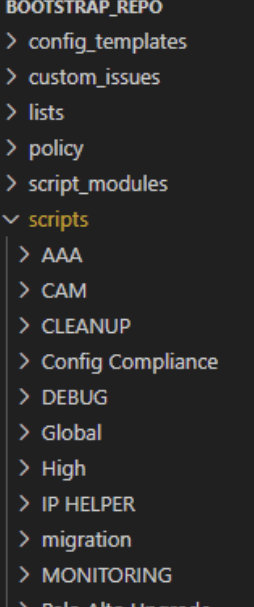
Here is an example of what it looks like in VSCode and a great feature we found out is that it uses “Categories” in NetMRI UI to create folders.
How Quickly Can You Get NetMRI Bootstrap Up and Running?
You can ‘git’ this up and running in a few minutes.

In all seriousness, we tested using a local “repo” and then configured that local “repo” to sync to a Private GitHub repo. It just took about 10 minutes; we were up and running!
Frequently Asked Questions
What is NetMRI Bootstrap and what does it manage?
NetMRI Bootstrap is an open-source tool (infobloxopen/netmri-bootstrap on GitHub) that creates a local repository for all your NetMRI Config Templates, Custom Issues, Lists, Policy/Rules, Script Modules, and Scripts — on either Windows or Linux.
How does NetMRI Bootstrap organize files in the local repository? It maps NetMRI “Categories” to folders. The category hierarchy you see in the NetMRI UI is reflected directly as a folder structure in your local repo and in editors like Visual Studio Code, making it easy to browse and edit templates without leaving your IDE.
How long does it take to set up NetMRI Bootstrap with a private GitHub repo? According to the author’s own testing, you can get a local repo created and synced to a private GitHub repository in roughly 10 minutes.
Comments
No comments yet — be the first to share your thoughts.